
Restart your iPhone
Learn how to turn your iPhone off, e poi riaccenderlo.
Come riavviare il tuo iPhone X, iPhone11, iPhone12, iPhone13, iPhone14,iPhone15
- Press and hold either volume button and the side button until the power-off slider appears.

- Drag the slider, then wait 30 seconds for your device to turn off. If your device is frozen or unresponsive, force restart your device.
- To turn your device back on, press and hold the side button (on the right side of your iPhone) until you see the Apple logo.
How to restart your iPhone 6, 7, 8, o SE (22a o 3a generazione)
- Press and hold the side button until the power-off slider appears.

- Drag the slider, then wait 30 seconds for your device to turn off. If your device is frozen or unresponsive, force restart your device.
- To turn your device back on, press and hold the side button until you see the Apple logo.
Come riavviare il tuo iPhone SE (1prima generazione), 5, or earlier
- Press and hold the top button until the power-off slider appears.
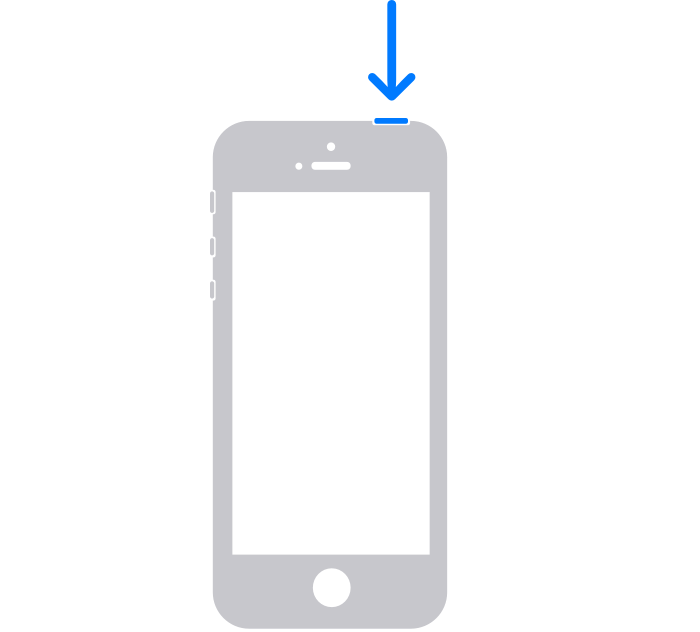
- Drag the slider, then wait 30 seconds for your device to turn off. If your device is frozen or unresponsive, force restart your device.
- To turn your device back on, press and hold the top button until you see the Apple logo.
If your reset is still unsuccessful refer to the official iPhone guide
https://support.apple.com/en-gb/HT201559
Maybe your iPhone needs some awesome phone cases!
-
 Custodia con stampa coccodrillo per Apple iPhone 15 14 12 11 13 Pro Max 13pro 14 15 Inoltre custodia per telefono in pelle PU con supporto ad anello 14Pro MAX$5.80
 -
 Custodia Magsafe per iPhone 14 13 12 11 15 Pro Massimo 15 Custodia protettiva per obiettivo in vetro con supporto per supporto Plus$15.96 – $21.68
 -
 Custodia resistente rosa KAWS Streetstyle per iPhone X XR XS SE 7 8 11 12 13 14 15 Pro Mini Plus Pro Max$25.00
 -
 3Custodia trasparente con stampa D Panda per iPhone X XR XS SE 7 8 11 12 13 14 15 Pro Mini Plus Pro Max$25.00
 -
 Custodia a venatura in legno retrò per iPhone Apple 15 Pro Massimo 14 11 12 13 Pro Massimo 15 Pro 14 Più copertina telefonica a prova di shock TPU$11.86 – $16.09
 -
 Custodia per telefono con supporto pieghevole simpatico orsacchiotto per iPhone 14 13 12 11 Pro Max X XS MAX XR 6 7 8 S Plus Se 2020 MiNi$8.15
 -
 3Custodia per iPhone con personaggio a forma di cuore con stampa D. Accessorio dolce e adorabile per il tuo iPhone$25.00
 -
 Custodia per telefono con circuito stampato per telefono cellulare Accessorio intelligente ed elegante per il tuo iPhone$25.00
 -
 Custodia per telefono con circuito stampato per telefono cellulare bruciato. Un modo divertente ed eccentrico per proteggere il tuo iPhone$25.00
 -
 La custodia per telefono Circuit and Snap mostra il funzionamento interno della custodia di ricarica wireless del telefono per iPhone$25.00
 -
 Custodia per telefono del circuito di telefonia mobile per pera un modo divertente e geek per proteggere il tuo iPhone$25.00
 -
 Custodia resistente con stampa 3D puzzle rosa opaco lucido e rosa chiaro per iPhone 15 14 SE$25.00
 -
 3D Stampa puzzle gialli e rosa con motivi sorprendenti Custodia resistente per iPhone 15 14 Inoltre Mini Pro Promax$25.00
 -
 3D Stampa puzzle verde e menta motivi sorprendenti che creano un'illusione realistica e vivida sul tuo telefono$25.00
 -
 3D Stampa puzzle verdi, gialli e rossi con motivi straordinari che creano un'illusione realistica e vivida sul tuo telefono$25.00
 -
 Custodia per telefono in TPU con stampa completa di dinosauro Cartoon Cutie per iPhone 15 Promax$25.00
 -
 Custodia per telefono in pelle natalizia a quadri e bambina carina per iPhone 15 Pro Massimo$25.00
 -
 Custodia protettiva in pelle nera con pizzo e quadri per iPhone 15 Pro Massimo$25.00