
Restart your iPhone
Learn how to turn your iPhone off, și apoi înapoi.
Cum să reporniți iPhone X, iPhone11, iPhone12, iPhone13, iPhone14,iPhone15
- Press and hold either volume button and the side button until the power-off slider appears.

- Drag the slider, then wait 30 seconds for your device to turn off. If your device is frozen or unresponsive, force restart your device.
- To turn your device back on, press and hold the side button (on the right side of your iPhone) until you see the Apple logo.
How to restart your iPhone 6, 7, 8, sau SE (2a nd sau a 3-a generație)
- Press and hold the side button until the power-off slider appears.

- Drag the slider, then wait 30 seconds for your device to turn off. If your device is frozen or unresponsive, force restart your device.
- To turn your device back on, press and hold the side button until you see the Apple logo.
Cum să reporniți iPhone SE (1generația st), 5, or earlier
- Press and hold the top button until the power-off slider appears.
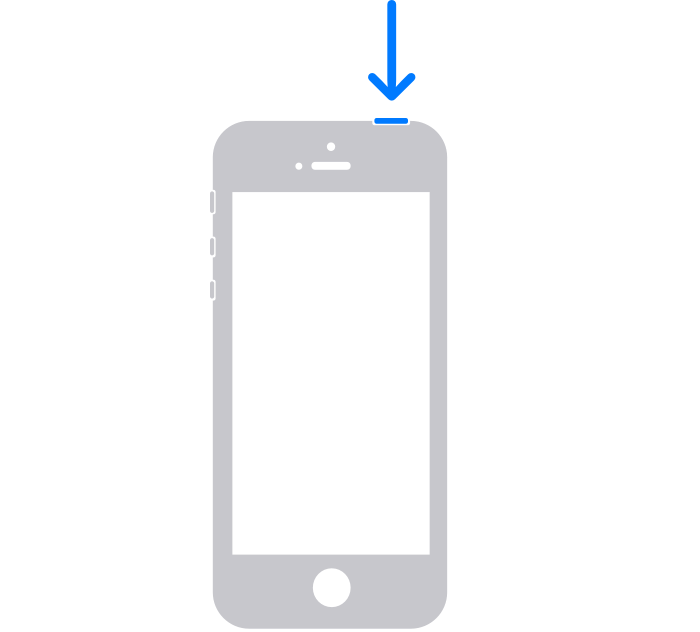
- Drag the slider, then wait 30 seconds for your device to turn off. If your device is frozen or unresponsive, force restart your device.
- To turn your device back on, press and hold the top button until you see the Apple logo.
If your reset is still unsuccessful refer to the official iPhone guide
https://support.apple.com/en-gb/HT201559
Maybe your iPhone needs some awesome phone cases!
-
 Husă cu imprimeu crocodil pentru Apple iPhone 15 14 12 11 13 Pro Max 13pro 14 15 Plus 14Pro MAX Ring Holder Husa telefon din piele PU$5.80
 -
 Husa Magsafe pentru iPhone 14 13 12 11 15 Pro Max 15 Suport suport plus capac de protecție a lentilelor din sticlă$15.96 – $21.68
 -
 Husă Roz KAWS Streetstyle Tough pentru iPhone X XR XS SE 7 8 11 12 13 14 15 Pro Mini Plus Pro Max$25.00
 -
 3Husă D Print Cute Panda Clear pentru iPhone X XR XS SE 7 8 11 12 13 14 15 Pro Mini Plus Pro Max$25.00
 -
 Husă retro din lemn pentru Apple Iphone 15 Pro Max 14 11 12 13 Pro Max 15 Pro 14 Plus Husa telefon TPU rezistenta la socuri$11.86 – $16.09
 -
 Husă pentru telefon cu suport pliabil cu ursuleț drăguț pentru iPhone 14 13 12 11 Pro Max X XS MAX XR 6 7 8 S Plus Se 2020 MiNi$8.15
 -
 3Husă pentru iPhone cu caracter de inimă D Print Accesoriu dulce și adorabil pentru iPhone-ul tău$25.00
 -
 Placă de circuite pentru telefon mobil Carcasă pentru telefon Accesoriu inteligent și elegant pentru iPhone-ul tău$25.00
 -
 Carcasă pentru telefon cu placa de circuite a telefonului mobil ars. Mod distractiv și ciudat de a vă proteja iPhone-ul$25.00
 -
 Carcasa pentru telefon Circuit și Snap arată funcționarea interioară a carcasei de încărcare fără fir a telefonului pentru iPhone$25.00
 -
 Circuitul de telefon mobil Pear Carcasă de telefon o modalitate distractivă și geeky de a vă proteja iPhone -ul$25.00
 -
 Husă robustă pentru iPhone, cu imprimare 3D, roz mat lucios și roz deschis 15 14 SE$25.00
 -
 3D Print Yellow and Pink Puzzles Stunning Patterns Husă rezistentă pentru iPhone 15 14 Plus Mini Pro Promax$25.00
 -
 3D Print Puzzles verde și mentă Modele uimitoare care creează o iluzie realistă și vie pe telefonul tău$25.00
 -
 3D Print Puzzle-uri verde, galben și roșu, modele uimitoare care creează o iluzie realistă și vie pe telefonul dvs.$25.00
 -
 Husă pentru telefon din TPU Cutie Cartoon Dinozaur pentru iPhone 15 Promax$25.00
 -
 Husă pentru telefon din piele de Crăciun cu carouri și fetiță drăguță pentru iPhone 15 Pro Max$25.00
 -
 Husă de protecție din piele neagră din dantelă și carouri pentru iPhone 15 Pro Max$25.00