
Restart your iPhone
Learn how to turn your iPhone off, En dan weer verder.
Hoe u uw iPhone X opnieuw start, iPhone11, iPhone12, iPhone13, iPhone14,iPhone15
- Press and hold either volume button and the side button until the power-off slider appears.

- Drag the slider, then wait 30 seconds for your device to turn off. If your device is frozen or unresponsive, force restart your device.
- To turn your device back on, press and hold the side button (on the right side of your iPhone) until you see the Apple logo.
How to restart your iPhone 6, 7, 8, of SE (2nd of 3e generatie)
- Press and hold the side button until the power-off slider appears.

- Drag the slider, then wait 30 seconds for your device to turn off. If your device is frozen or unresponsive, force restart your device.
- To turn your device back on, press and hold the side button until you see the Apple logo.
Hoe u uw iPhone SE opnieuw start (1ST -generatie), 5, or earlier
- Press and hold the top button until the power-off slider appears.
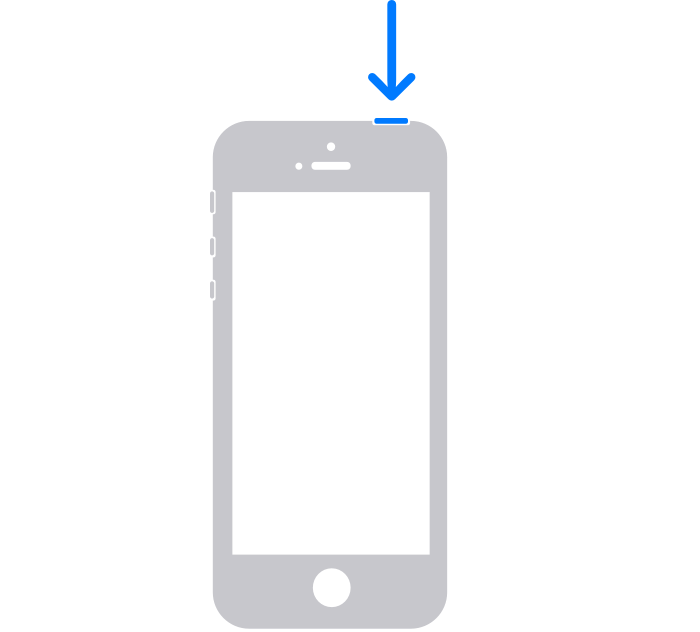
- Drag the slider, then wait 30 seconds for your device to turn off. If your device is frozen or unresponsive, force restart your device.
- To turn your device back on, press and hold the top button until you see the Apple logo.
If your reset is still unsuccessful refer to the official iPhone guide
https://support.apple.com/en-gb/HT201559
Maybe your iPhone needs some awesome phone cases!
-
 Hoesje met krokodillenprint voor Apple iPhone 15 14 12 11 13 ProMax 13pro 14 15 Plus 14Pro MAX ringhouder PU lederen telefoonhoes$5.80
 -
 Magsafe-hoesje voor iPhone 14 13 12 11 15 ProMax 15 Plus standaardhouder glazen lensbeschermer$15.96 – $21.68
 -
 Roze KAWS Streetstyle stoer hoesje voor iPhone X XR XS SE 7 8 11 12 13 14 15 Pro Mini Plus Pro Max$25.00
 -
 3D Print schattig panda transparant hoesje voor iPhone X XR XS SE 7 8 11 12 13 14 15 Pro Mini Plus Pro Max$25.00
 -
 Retro houtnerf hoesje voor Apple Iphone 15 ProMax 14 11 12 13 ProMax 15 Pro 14 Plus TPU schokbestendige telefoonhoes$11.86 – $16.09
 -
 Telefoonhoesje met schattige teddybeer opvouwbare standaard voor iPhone 14 13 12 11 Pro Max X XS MAX XR 6 7 8 S Plus Se 2020 Mini$8.15
 -
 3D Print iPhone-hoesje met hartkarakter Lief en schattig accessoire voor je iPhone$25.00
 -
 Mobiele telefoon printplaat Telefoonhoesje Slim en strak accessoire voor uw iPhone$25.00
 -
 Verbrande mobiele telefoon printplaat telefoonhoesje Leuke en eigenzinnige manier om je iPhone te beschermen$25.00
 -
 Circuit- en kliktelefoonhoesje toont de innerlijke werking van uw telefoon Draadloos oplaadhoesje voor iPhone$25.00
 -
 PEAR Mobile Phone Circuit Board Telefoon Case Een leuke en geeky manier om uw iPhone te beschermen$25.00
 -
 Glanzend matroze en lichtroze 3D-printpuzzels stoer hoesje voor iPhone 15 14 ZO$25.00
 -
 3D Print geel en roze puzzels, prachtige patronen, stoer hoesje voor iPhone 15 14 Plus Mini Pro Promax$25.00
 -
 3D Print groene en muntkleurige puzzels Verbluffende patronen die een realistische en levendige illusie op uw telefoon creëren$25.00
 -
 3D Print groengele en rode puzzels Verbluffende patronen die een realistische en levendige illusie op uw telefoon creëren$25.00
 -
 Volledige print Cutie Cartoon dinosaurus TPU telefoonhoesje voor iPhone 15 Promax$25.00
 -
 Plaids en schattig klein meisje kerst leren telefoonhoesje voor iPhone 15 ProMax$25.00
 -
 Zwart lederen beschermhoes met kant en plaids voor iPhone 15 ProMax$25.00