
Restart your iPhone
Learn how to turn your iPhone off, y luego de nuevo.
Cómo reiniciar tu iPhone X, iPhone11, iPhone12, iPhone13, iPhone14,iPhone15
- Press and hold either volume button and the side button until the power-off slider appears.

- Drag the slider, then wait 30 seconds for your device to turn off. If your device is frozen or unresponsive, force restart your device.
- To turn your device back on, press and hold the side button (on the right side of your iPhone) until you see the Apple logo.
How to restart your iPhone 6, 7, 8, o SE (2Segunda o tercera generación)
- Press and hold the side button until the power-off slider appears.

- Drag the slider, then wait 30 seconds for your device to turn off. If your device is frozen or unresponsive, force restart your device.
- To turn your device back on, press and hold the side button until you see the Apple logo.
Cómo reiniciar tu iPhone SE (1primera generación), 5, or earlier
- Press and hold the top button until the power-off slider appears.
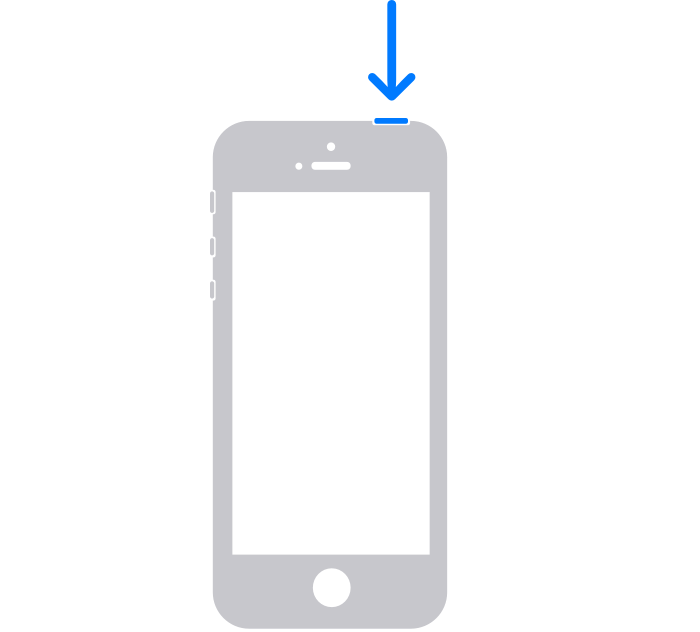
- Drag the slider, then wait 30 seconds for your device to turn off. If your device is frozen or unresponsive, force restart your device.
- To turn your device back on, press and hold the top button until you see the Apple logo.
If your reset is still unsuccessful refer to the official iPhone guide
https://support.apple.com/en-gb/HT201559
Maybe your iPhone needs some awesome phone cases!
-
 Funda con estampado de cocodrilo para Apple iPhone 15 14 12 11 13 Pro Max 13pro 14 15 Funda de teléfono de cuero PU con soporte para anillo Plus 14Pro MAX$5.80
 -
 Funda Magsafe para iPhone 14 13 12 11 15 Pro Máximo 15 Cubierta protectora de lente de vidrio con soporte Plus$15.96 – $21.68
 -
 Funda rígida rosa KAWS Streetstyle para iPhone X XR XS SE 7 8 11 12 13 14 15 Pro Mini Plus Pro Máx.$25.00
 -
 3Funda transparente D Print Cute Panda para iPhone X XR XS SE 7 8 11 12 13 14 15 Pro Mini Plus Pro Máx.$25.00
 -
 Funda retro de grano de madera para Apple Iphone 15 Pro Máximo 14 11 12 13 Pro Máximo 15 Pro 14 Plus cubierta de teléfono TPU a prueba de golpes$11.86 – $16.09
 -
 Funda para teléfono con soporte plegable con lindo osito de peluche para iPhone 14 13 12 11 Pro Max X XS MAX XR 6 7 8 S Plus Se 2020 Mini$8.15
 -
 3Funda para iPhone con personaje de corazón con estampado D Accesorio dulce y adorable para tu iPhone$25.00
 -
 Caja del teléfono de la placa de circuito del teléfono móvil Accesorio elegante y elegante para su iPhone$25.00
 -
 Estuche para teléfono con placa de circuito de teléfono móvil quemado Una forma divertida y peculiar de proteger su iPhone$25.00
 -
 La funda para teléfono Circuit and Snap muestra el funcionamiento interno de su teléfono Funda de carga inalámbrica para iPhone$25.00
 -
 Pear Mobile Telephone Circuit Board Telephone Una forma divertida y geek de proteger su iPhone$25.00
 -
 Estuche rígido con rompecabezas con estampado 3D en rosa mate brillante y rosa claro para iPhone 15 14 SE$25.00
 -
 3D Print Rompecabezas amarillos y rosas Patrones impresionantes Estuche rígido para iPhone 15 14 Más Mini Pro Promax$25.00
 -
 3D Imprima rompecabezas verdes y menta con impresionantes patrones que crean una ilusión realista y vívida en su teléfono$25.00
 -
 3D Imprima rompecabezas verdes, amarillos y rojos con impresionantes patrones que crean una ilusión realista y vívida en su teléfono$25.00
 -
 Caja del teléfono de TPU del dinosaurio de la historieta de Cutie de la impresión completa para el iPhone 15 promax$25.00
 -
 Funda de teléfono de cuero navideña con cuadros y niña linda para iPhone 15 Pro Máximo$25.00
 -
 Funda protectora de cuero negro con encaje y cuadros para iPhone 15 Pro Máximo$25.00