
Restart your iPhone
Learn how to turn your iPhone off, und dann wieder auf.
So starten Sie Ihr iPhone X neu, iPhone11, iPhone12, iPhone13, iPhone14,iPhone15
- Press and hold either volume button and the side button until the power-off slider appears.

- Drag the slider, then wait 30 seconds for your device to turn off. If your device is frozen or unresponsive, force restart your device.
- To turn your device back on, press and hold the side button (on the right side of your iPhone) until you see the Apple logo.
How to restart your iPhone 6, 7, 8, oder se (2ND oder 3. Generation)
- Press and hold the side button until the power-off slider appears.

- Drag the slider, then wait 30 seconds for your device to turn off. If your device is frozen or unresponsive, force restart your device.
- To turn your device back on, press and hold the side button until you see the Apple logo.
So starten Sie Ihr iPhone SE neu (1ST -Generation), 5, or earlier
- Press and hold the top button until the power-off slider appears.
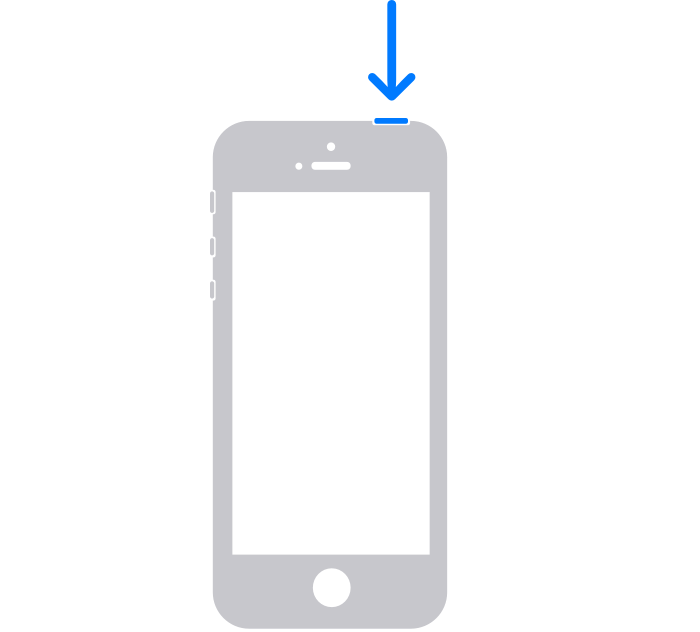
- Drag the slider, then wait 30 seconds for your device to turn off. If your device is frozen or unresponsive, force restart your device.
- To turn your device back on, press and hold the top button until you see the Apple logo.
If your reset is still unsuccessful refer to the official iPhone guide
https://support.apple.com/en-gb/HT201559
Maybe your iPhone needs some awesome phone cases!
-
 Schutzhülle mit Krokodilmuster für das Apple iPhone 15 14 12 11 13 Pro Max 13pro 14 15 Plus 14Pro MAX Ringhalter PU-Leder-Telefonabdeckung$5.80
 -
 Magsafe-Hülle für iPhone 14 13 12 11 15 Pro Max 15 Plus Ständerhalter Glaslinsenschutzabdeckung$15.96 – $21.68
 -
 Rosa KAWS Streetstyle Tough Case für iPhone X XR XS SE 7 8 11 12 13 14 15 Pro Mini Plus Pro Max$25.00
 -
 3D Print Cute Panda Clear Case für iPhone X XR XS SE 7 8 11 12 13 14 15 Pro Mini Plus Pro Max$25.00
 -
 Retro Holzmaserung Hülle für Apple Iphone 15 Pro Max 14 11 12 13 Pro Max 15 Profi 14 Plus stoßfeste TPU-Telefonabdeckung$11.86 – $16.09
 -
 Handyhülle mit niedlichem Teddybär-Faltständer für iPhone 14 13 12 11 Pro Max X XS MAX XR 6 7 8 S Plus Se 2020 Mini$8.15
 -
 3D-Print-Herz-Charakter-iPhone-Hülle. Süßes und bezauberndes Accessoire für Ihr iPhone$25.00
 -
 Handy-Schutzhülle mit Platine. Intelligentes und elegantes Zubehör für Ihr iPhone$25.00
 -
 Verbrannte Handy-Leiterplatten-Handyhülle. Lustige und skurrile Art, Ihr iPhone zu schützen$25.00
 -
 Die Circuit and Snap-Telefonhülle zeigt das Innenleben der kabellosen Ladehülle Ihres Telefons für das iPhone$25.00
 -
 Pear Mobile Telefon Circuit Board Telefon Hülle Eine unterhaltsame und geekige Möglichkeit, Ihr iPhone zu schützen$25.00
 -
 Glänzende, matte rosa und hellrosa 3D-Druck-Puzzles-Schutzhülle für das iPhone 15 14 SE$25.00
 -
 3D Print Gelbe und rosa Puzzles, atemberaubende Muster, robuste Hülle für das iPhone 15 14 Plus Mini Pro Promax$25.00
 -
 3D Drucken Sie grüne und mintfarbene Puzzles mit atemberaubenden Mustern, die eine realistische und lebendige Illusion auf Ihrem Telefon erzeugen$25.00
 -
 3D Print Grün-Gelb-Rot-Puzzles Atemberaubende Muster, die eine realistische und lebendige Illusion auf Ihrem Telefon erzeugen$25.00
 -
 Vollständig bedruckte süße Cartoon-Dinosaurier-TPU-Handyhülle für das iPhone 15 Promax$25.00
 -
 Karierte und niedliche kleine Mädchen-Weihnachtsleder-Handyhülle für das iPhone 15 Pro Max$25.00
 -
 Schutzhülle aus schwarzem Leder mit Spitze und Karos für das iPhone 15 Pro Max$25.00